
New Interface
A fresh, new
training experience.
training experience.
Refreshed interface and improved library navigation.
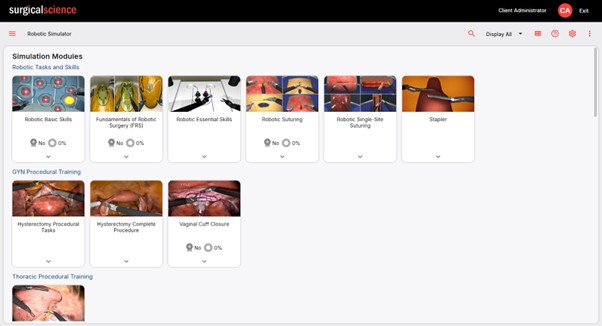
Version 60 brings a fully refreshed visual theme that improves readability across desktops, tablets, and smaller screens, with better support for dark mode. The Library now features an improved card view for a clearer, more consistent display of learning content across all content types.

Performance Reporting
Deeper insight into
learner performance.
learner performance.
Reports that surface what matters most.
The Performance Report has a new interface that clearly separates attempt scores from overall performance, improving visibility of benchmark completion and progress. A new Common Mistakes section highlights areas where the required level was not achieved across multiple attempts - helping identify recurring gaps that need additional focus.


Cloud Features
Organization-wide
analytics and playback.
analytics and playback.
Live visibility across users, groups, and sessions.
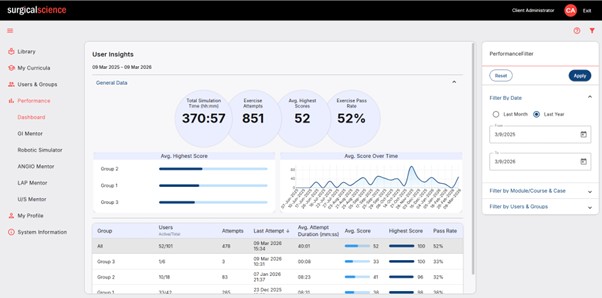
The User Insights Dashboard provides a dynamic overview of system usage and performance across users and groups - automatically updated as sessions are completed, filterable by time, simulator, module, or group. The Playback Report lets users review recordings of simulation attempts, track performance metrics along the timeline, and add bookmarks to highlight key moments.

Program Management
Structured,
time-bound assignments.
time-bound assignments.
More control over training timelines and learner access.
Assignments can now be scheduled with start and end dates. Modules or courses are only available during the configured date range - giving program managers better control over training timelines, learner access, and cohort progress across the organization.

AI-Powered Training
Personalized session
recommendations.
recommendations.
Training that adapts to each learner's progress.
This training session is generated automatically based on your recent performance history. The system analyzes your demonstrated skills, consistency of results, and progression over time. Based on this analysis, it selects the exercise that is expected to provide the greatest educational benefit at your current stage.


